Feature flags
Feature flags allow developers to opt-in for experimental changes or opt-out from recent changes that have already been made default. Feature flags serve as a tool for incremental rollout of new implementation without affecting the general stability of the library, allowing to gather feedback from early adopters. There are two types of feature flags: static and dynamic.
Summary of available feature flags
| Feature flag name | Type | Added in | Removed in | Default value |
|---|---|---|---|---|
IOS_DYNAMIC_FRAMERATE_ENABLED | static | 0.6.0 | – | true |
FETCH_PREVIEW_ENABLED | static | 0.8.0 | – | false |
ENABLE_CROSS_RUNTIME_STACK_TRACES | static | 0.9.0 | – | true |

 info
infoFeature flags available in react-native-reanimated are listed on this page.
Description of available feature flags
IOS_DYNAMIC_FRAMERATE_ENABLED
This feature flags is supposed to improve the visual perception and perceived smoothness of computationally expensive animations. When enabled, the frame rate will be automatically adjusted for current workload of the UI thread. For instance, if the device fails to run animations in 120 fps which would usually results in irregular frame drops, the mechanism will fallback to stable 60 fps. For more details, see PR #7624.
FETCH_PREVIEW_ENABLED
This feature flag enables the preview of fetch API on Worklet Runtimes in the Bundle Mode. Make sure to follow the rest of the setup instructions after enabling this flag. This flag only takes effect in Bundle Mode.
ENABLE_CROSS_RUNTIME_STACK_TRACES
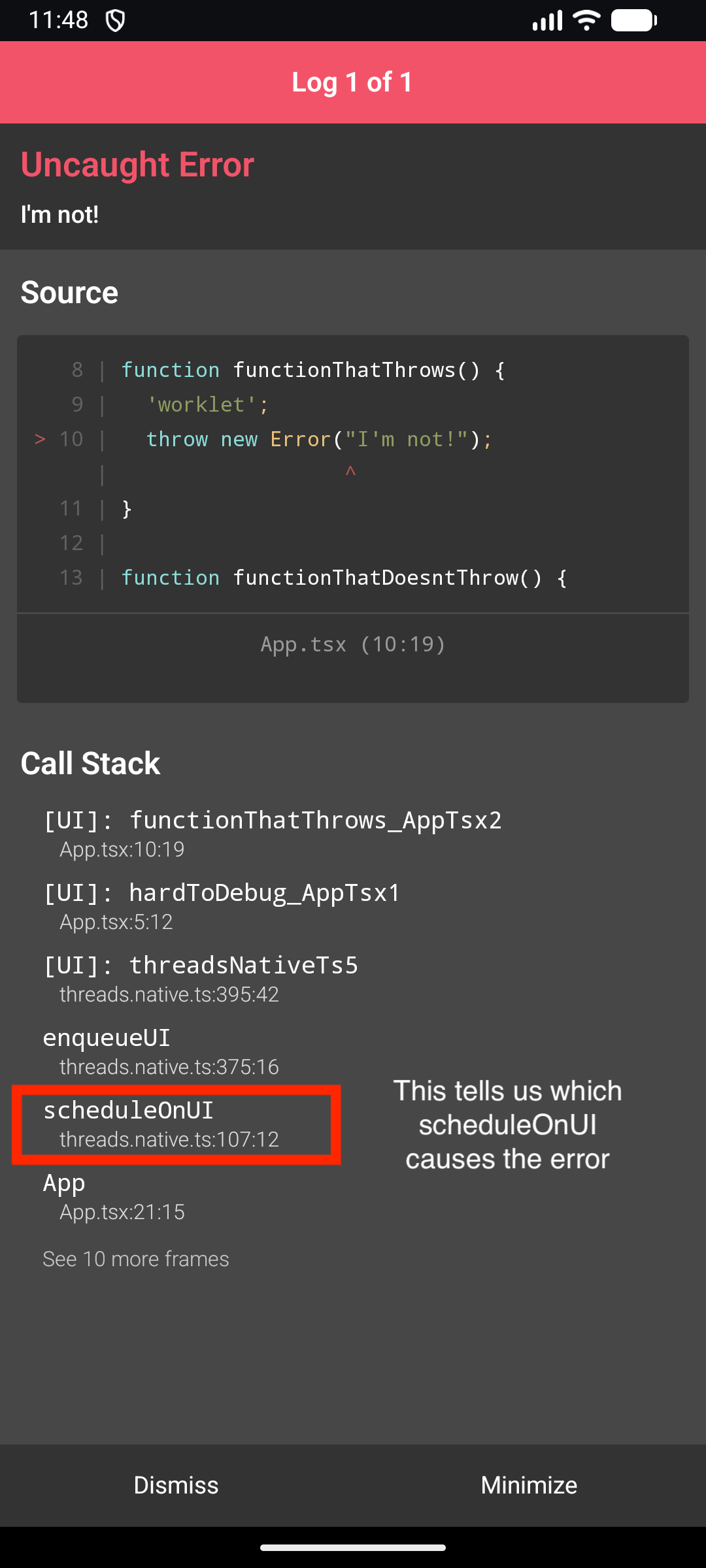
When enabled, the JavaScript call site that schedules a worklet (via scheduleOnUI, scheduleOnRuntime and similar) is captured and attached to the worklet. If the worklet then throws on the worklet runtime, the resulting error stack is stitched together with the original scheduling stack so the LogBox entry points back to the line that scheduled it, rather than ending at the worklet runtime boundary. This makes errors thrown deep inside worklets much easier to trace back to their origin in your app code.
This flag only takes effect in development builds (__DEV__). In release builds, capturing the scheduling stack is skipped regardless of the flag value to avoid the runtime overhead.
Capturing extra stack trace data can significantly hurt performance in code paths that perform many async/worklet scheduling calls. We recommend opting out of this flag in those situations.
Given the following snippet:
import { scheduleOnUI } from 'react-native-worklets';

function hardToDebug(callback: () => void) {
  'worklet';
  callback();
}

function functionThatThrows() {
  'worklet';
  throw new Error("I'm not!");
}

function functionThatDoesntThrow() {
  'worklet';
  console.log("I'm okay");
}

export default function App() {
  // Which invocation throws?
  scheduleOnUI(hardToDebug, functionThatDoesntThrow);
  scheduleOnUI(hardToDebug, functionThatThrows);
  scheduleOnUI(hardToDebug, functionThatDoesntThrow);
  return null;
}
The call stack reported in LogBox differs depending on whether the flag is enabled:
Enabled
Disabled
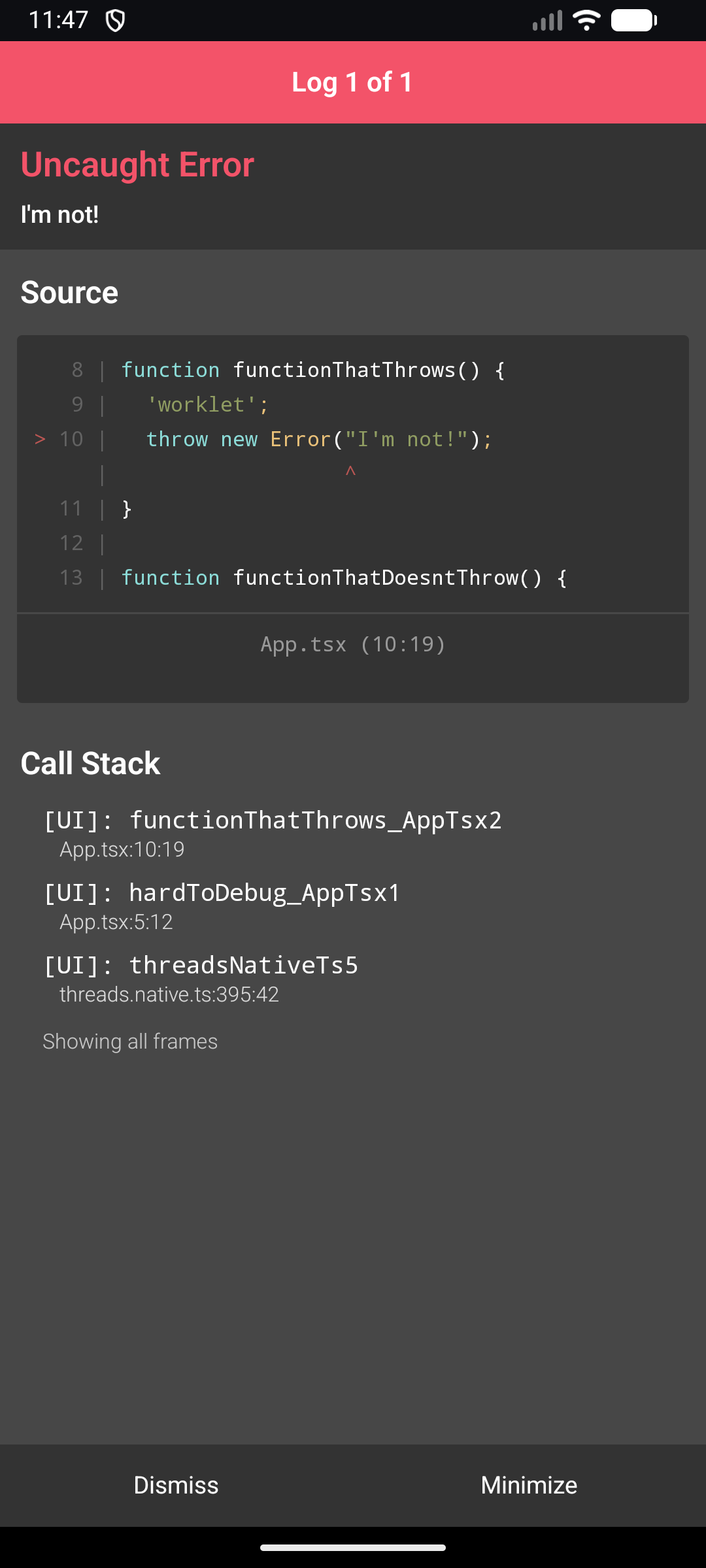
The frames without the [UI]: prefix (enqueueUI, scheduleOnUI, App, ...) are the ones contributed by this feature. They come from the RN runtime call site that scheduled the worklet. Without the flag, the stack stops at the worklet runtime boundary and only the [UI]: frames are visible.
Static feature flags
Static flags are intended to be resolved during code compilation and cannot be changed during application runtime. To enable a static feature flag, you need to:
- Add the following lines to
package.jsonof your app
{
  // ...
  "worklets": {
    "staticFeatureFlags": {
      "EXAMPLE_STATIC_FLAG": true
    }
  }
}
- Run
pod install(iOS only) - Rebuild the native app
warningStatic feature flags are not supported in environments where Worklets is prebuilt with the default configuration of flags, like for instance in Expo Go and RNRepo.
- It's not possible to modify static feature flags in Expo Go. Please consider using Expo Prebuild instead.
- If your project uses RNRepo, you need to force building Worklets from source by adding it to the deny list as described in RNRepo's documentation.
To read a static feature flag value in JavaScript, you can use getStaticFeatureFlag function.
Dynamic feature flags
Dynamic flags can be modified during runtime and their values can change at any moment of app lifetime. To enable or disable a dynamic feature flag, you need to call setDynamicFeatureFlag function.
import { setDynamicFeatureFlag } from 'react-native-worklets';

setDynamicFeatureFlag('EXAMPLE_DYNAMIC_FLAG', true);
To read a dynamic feature flag value in JavaScript, you can use getDynamicFeatureFlag function.
Comparison of static and dynamic feature flags
| Static feature flags | Dynamic feature flags | |
|---|---|---|
| Value is known during app build | ✅ | ❌ |
| Value may change during app lifetime | ❌ | ✅ |
| Value change requires app rebuild | ✅ | ❌ |
| Can be changed via public JavaScript API | ❌ | ✅ |
Can be changed via app's package.json | ✅ | ❌ |
| Can be changed when using Expo Go or RNRepo | ❌ | ✅ |
Remarks for contributors
- Feature flags should switch the implementation to the new experimental behavior only when enabled.
- Initially, the default value should be false, allowing users to opt-in for the experimental behavior when desired.
- When the experimental behavior is considered stable, the default value should be set to true, while still allowing users to opt-out if needed.
- After some period, the feature flag which is enabled by default should be removed from the codebase.
- Both static and dynamic feature flags should follow upper snake case, i.e.
EXAMPLE_FEATURE_FLAG. - The name of the feature flag should not contain the expression
FEATURE_FLAGitself. - It is recommended to explicitly use
ENABLE_orDISABLE_prefix for feature flags that enable or disable certain parts of the code for the sake of clarity.