
Troubleshooting
Here are some common debugger caveats. If you encounter other problems, please create an issue here, or contact us via Telegram channel.
The "▶ Debug Test" lens is not visible
- Make sure that you have followed the installation instructions - especially that versions of the installed tools are correct.
- Quit and reopen VSCode if the lens does not appear after installation. Make sure the VSCode process has all the required tools in its
PATHenv var.
A breakpoint is hollow-grey
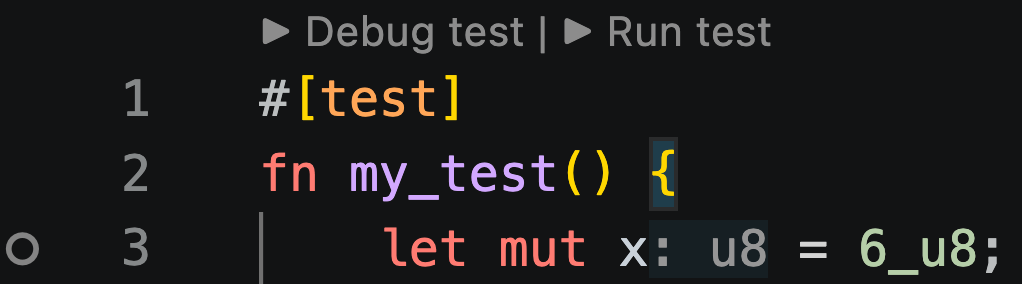
A hollow breakpoint after launching the debugger means the debugger determined that the line cannot be hit during execution. Such a breakpoint is called an unverified breakpoint.
This is a result of an optimization applied during Sierra to CASM compilation that cannot be disabled.
NOTE
Cairo compiles down to Sierra, which compiles to CASM. Due to optimizations of Sierra to CASM compiler, certain sierra statements have no corresponding CASM instructions. Since Cairo Debugger relies on Cairo VM - which executes CASM instructions - Cairo source code lines that produce such Sierra statements cannot be a valid breakpoint.
Some variables are not shown
Prior to snforge 0.62.0, the debugger only displayed simple numeric variables that fit within a single felt252.
From snforge 0.62.0 onwards, the debugger additionally supports:
- structs
- enums
- arrays and spans
- tuples
booldisplayed astrue/falseNonZerodisplayed as e.g.NonZero(5)- common Starknet types (
ContractAddress,ClassHash,StorageAddress,StorageBaseAddress) displayed in hexadecimal format e.g.ContractAddress(0x5af)
WARNING
The support for structs and enums works best with Scarb >= 2.19.0 - previous versions cannot produce some of the debug information. You may still use other Scarb versions but names of structs, enums, their fields and variants will not be available.
Contract calls are skipped
Currently, the debugger does not enter contract calls. Since each contract call is executed in a separate VM, some architectural changes are required to support it.
Support for contract calls is in progress - you can track it here.
Offset overflow error
In some packages while launching the debugger, you may get an error similar to the following one:
[ERROR] #100056->#100057: Got 'Offset overflow' error while moving [13] introduced at #99752->#99753 output #1.
[ERROR] Error while compiling Sierra. Make sure you have the latest universal-sierra-compiler binary installed. Contact Starknet Foundry team through Github or Telegram if it doesn't help.: Command universal-sierra-compiler failed with status exit status: 2
This error happens due to overflow of offset value during Sierra to CASM compilation.
This occurs e.g. in version 0.10.0 of alexandria_encoding due to existence of this test.
NOTE
You can try to circumvent this issue by adding calls to core::internal::revoke_ap_tracking to some of your functions - especially the ones that are the most computation intensive. However, intuition about where to do add the calls is based on strong knowledge of Sierra internals.