BaseAudioContext
The BaseAudioContext interface acts as a supervisor of audio-processing graphs. It provides key processing parameters such as current time, output destination or sample rate.
Additionally, it is responsible for nodes creation and audio-processing graph's lifecycle management.
However, BaseAudioContext itself cannot be directly utilized, instead its functionalities must be accessed through one of its derived interfaces: AudioContext, OfflineAudioContext, or WorkletAudioContext.
Audio graph
An audio graph is a structured representation of audio processing elements and their connections within an audio context. The graph consists of various types of nodes, each performing specific audio operations, connected in a network that defines the audio signal flow. In general we can distinguish four types of nodes:
- Source nodes (e.g
AudioBufferSourceNode,OscillatorNode) - Effect nodes (e.g
GainNode,BiquadFilterNode) - Analysis nodes (e.g
AnalyserNode) - Destination nodes (e.g
AudioDestinationNode)
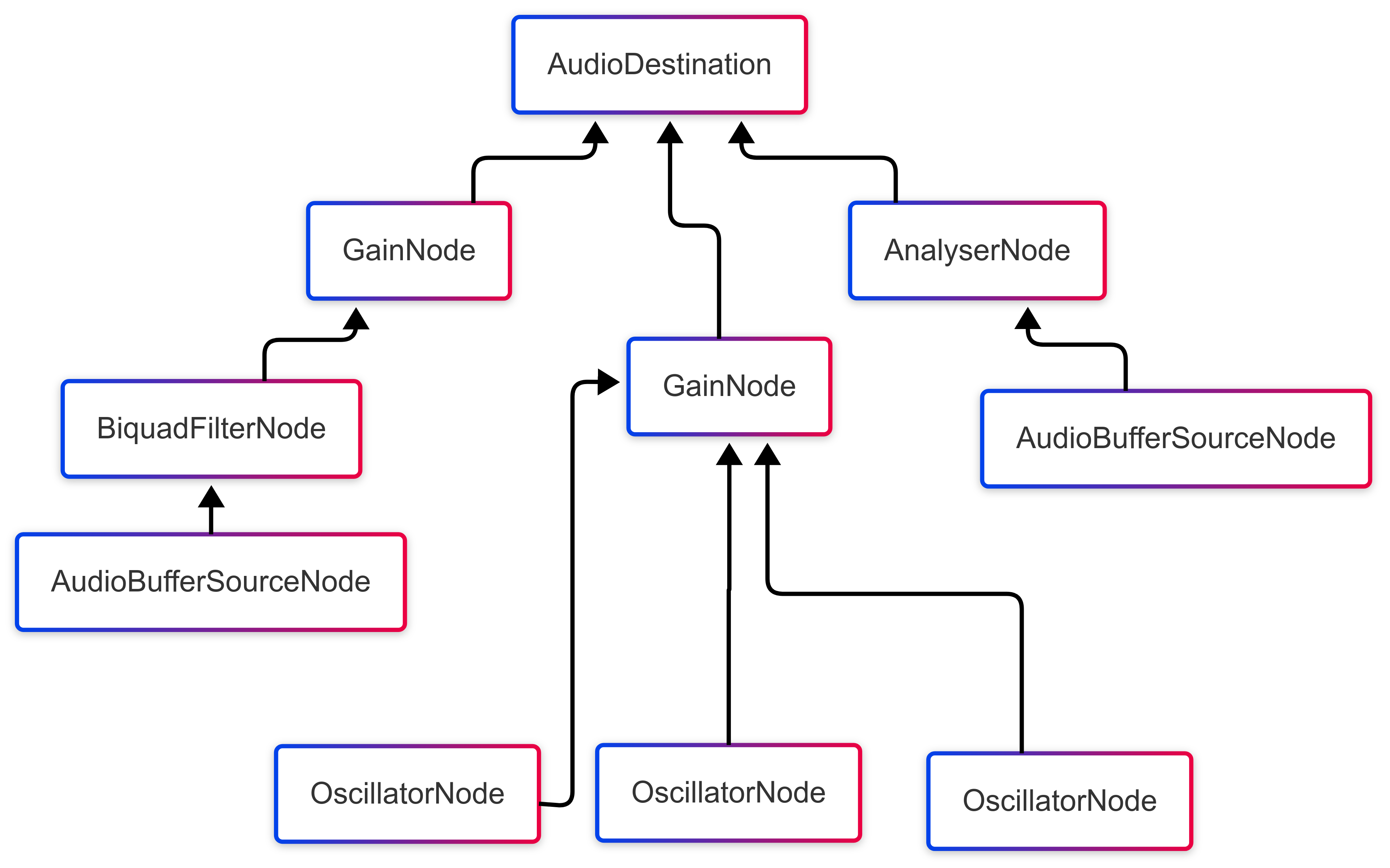
Rendering the audio graph
Audio graph rendering is done in blocks of sample-frames. The number of sample-frames in a block is called render quantum size, and the block itself is called a render quantum.
By default render quantum size value is 128 and it is a constant.
The AudioContext rendering thread is driven by a system-level audio callback.
Each call has a system-level audio callback buffer size, which is a varying number of sample-frames that needs to be computed on time before the next system-level audio callback arrives,
but render quantum size does not have to be a divisor of the system-level audio callback buffer size.

 info
infoConcept of system-level audio callback does not apply to OfflineAudioContext or WorkletAudioContext.
Properties
| Name | Type | Description | |
|---|---|---|---|
currentTime | number | Double value representing an ever-increasing hardware time in seconds, starting from 0.0. | Read only |
destination | AudioDestinationNode | Final output destination associated with the context. | Read only |
listener | AudioListener | Listener used for 3D spatialization, shared by all PannerNodes in the context. | Read only |
sampleRate | number | Float value representing the sample rate (in samples per seconds) used by all nodes in this context. | Read only |
state | ContextState | Enumerated value represents the current state of the context. | Read only |
Methods
createAnalyser
Creates AnalyserNode.
Returns: AnalyserNode
createBiquadFilter
Creates BiquadFilterNode.
Returns: BiquadFilterNode
createBuffer
Creates AudioBuffer.
| Parameter | Type | Description |
|---|---|---|
numOfChannels | number | An integer representing the number of channels of the buffer. |
length | number | An integer representing the length of the buffer in sampleFrames. Two seconds buffer has length equals to 2 * sampleRate. |
sampleRate | number | A float representing the sample rate of the buffer. |
Errors
| Error type | Description |
|---|---|
NotSupportedError | numOfChannels is outside the nominal range [1, 32]. |
NotSupportedError | sampleRate is outside the supported range [3000, 768000]. |
NotSupportedError | length is less then 1. |
Returns: AudioBuffer
createBufferSource
Creates AudioBufferSourceNode.
| Parameter | Type | Description |
|---|---|---|
options Optional | { pitchCorrection: boolean } | Boolean that specifies if pitch correction has to be available. |
Returns: AudioBufferSourceNode
createBufferQueueSource Mobile only
Creates AudioBufferQueueSourceNode.
| Parameter | Type | Description |
|---|---|---|
options Optional | AudioBufferQueueSourceOptions | Constructor options for AudioBufferQueueSourceNode. |
Returns: AudioBufferQueueSourceNode
createChannelMerger
Creates ChannelMergerNode.
| Parameter | Type | Description |
|---|---|---|
numberOfInputs Optional | number | Number of inputs to merge (range 1 – 32, default 6). |
Returns: ChannelMergerNode
createChannelSplitter
Creates ChannelSplitterNode.
| Parameter | Type | Description |
|---|---|---|
numberOfOutputs Optional | number | Number of outputs to split into (range 1 – 32, default 6). |
Returns: ChannelSplitterNode
createConstantSource
Creates ConstantSourceNode.
Returns: ConstantSourceNode
createConvolver
Creates ConvolverNode.
Returns: ConvolverNode
createDelay
Creates DelayNode
| Parameter | Type | Description |
|---|---|---|
maxDelayTime Optional | number | Maximum amount of time to buffer delayed values |
Returns: DelayNode
createGain
Creates GainNode.
Returns: GainNode
createIIRFilter
Creates IIRFilterNode.
Returns: IIRFilterNode
createOscillator
Creates OscillatorNode.
Returns: OscillatorNode
createPanner
Creates PannerNode.
Returns: PannerNode
createPeriodicWave
Creates PeriodicWave. This waveform specifies a repeating pattern that an OscillatorNode can use to generate its output sound.
| Parameter | Type | Description |
|---|---|---|
real | Float32Array | An array of cosine terms. |
imag | Float32Array | An array of sine terms. |
constraints Optional | { disableNormalization: boolean } | An object that specifies if normalization is disabled. If so, periodic wave will have maximum peak value of 1.0 and minimum peak value of -1.0. |
Errors
| Error type | Description |
|---|---|
InvalidAccessError | real and imag arrays do not have same length. |
Returns: PeriodicWave
createRecorderAdapter
Creates a RecorderAdapterNode — an AudioNode that
adapts an AudioRecorder into the audio graph.
Feed it using AudioRecorder.connect and
connect it downstream like any other node. Produces silence until a recorder is
connected to it.
Returns: RecorderAdapterNode
createStereoPanner
Creates StereoPannerNode.
Returns: StereoPannerNode
createWaveShaper
Creates WaveShaperNode.
Returns: WaveShaperNode
decodeAudioData
Decodes audio data from a file path, an ArrayBuffer, or a bundled app asset (a number module id returned by require('./audio.mp3')). The decoded audio is automatically resampled to match the audio context's sampleRate.
For the list of supported formats visit this page.
| Parameter | Type | Description |
|---|---|---|
input | ArrayBuffer | ArrayBuffer with encoded audio data. |
string | Path to a remote or local audio file. | |
number Mobile only | React Native asset module id (for example, the value returned by require('./audio.mp3')). | |
fetchOptionsOptional | RequestInit | Additional fetch options when input is a remote URL (for example, auth headers). |
cautionnumber as input, decoding resolves the bundled asset through React Native's Image component. By default, only .mp3, .wav, .mp4, .m4a, and .aac assets are supported. To use other formats, see static non-image resources.Returns: Promise<AudioBuffer>
Example decoding audio
const url = ... // url to an audio

const buffer = await audioContext.decodeAudioData(url);
decodePCMInBase64
Decodes base64-encoded PCM audio data.
| Parameter | Type | Description |
|---|---|---|
base64String | string | Base64-encoded PCM audio data. |
inputSampleRate | number | Sample rate of the input PCM data. |
inputChannelCount | number | Number of channels in the input PCM data. |
isInterleaved Optional | boolean | Whether the PCM data is interleaved. Default is true. |
Returns: Promise<AudioBuffer>


Example decoding with data in base64 format
const data = ... // data encoded in base64 string
// data is not interleaved (Channel1, Channel1, ..., Channel2, Channel2, ...)
const buffer = await this.audioContext.decodeAudioData(data, 4800, 2, false);
Events
onstatechange
Sets (or removes, when null is assigned) a callback fired whenever the context's state changes to a different value.
The event is dispatched by the native audio engine once a transition is acknowledged — after the promise of the operation that caused it (resume, suspend, close, OfflineAudioContext.startRendering) has resolved. Code awaiting that promise always observes the new state value first; the statechange callback runs in a later task.
It also fires for transitions no method call requested, e.g. when the context starts running implicitly because a source node's start() engaged the audio driver.
The callback receives no arguments; read the new value from the context's state property, which is already updated when the callback runs.
const audioContext = new AudioContext();

audioContext.onstatechange = () => {
  console.log(`state is now ${audioContext.state}`);
};

await audioContext.resume(); // logs "state is now running" shortly after
Remarks
currentTime
- Timer starts when context is created, stops when context is suspended.
ContextState
Acceptable values:
suspended
The audio context has been suspended (with one of suspend or OfflineAudioContext.suspend).
running
The audio context is running normally.
closed
The audio context has been closed (with close method).