
Studio MCP
Pulsar Studio ships an MCP server that lets an AI agent (Claude Code, Codex, or anything that speaks MCP) drive your live Studio editor. The agent reads the current state, edits presets, generates haptics from audio, and plays patterns on a paired phone - and you watch every change happen in the browser tab you have open.
The MCP endpoint is remote HTTP hosted alongside Studio, so there is nothing to install or run locally. Commands the agent sends are forwarded to your open Studio tab, which executes them against the live editor - the canvas updates instantly and the change autosaves.
Prerequisites
Section titled “Prerequisites”- A Pulsar Studio account, signed in.
- Studio open in a browser tab. The tab is what executes commands and runs the audio/animation analysis, so keep it open while the agent works. If no tab is open, read/write of preset data still works, but playback, audio analysis, and generation return a clear “open Studio” error.
1. Install the Pulsar skill (recommended)
Section titled “1. Install the Pulsar skill (recommended)”The skill gives your agent the connection details and a map of what the Studio MCP can do, so a plain-language request like “connect to Studio and design a double-tap” just works. It lives in the software-mansion-labs/skills repository.
Via npx:
npx skills add software-mansion-labs/skills --skill pulsar-haptics2. Add the MCP server
Section titled “2. Add the MCP server”Point your agent at the hosted endpoint. There is no package to install.
Claude Code:
claude mcp add --transport http -s user pulsar https://pulsar-server.swmansion.com/mcpCodex (~/.codex/config.toml):
[mcp_servers.pulsar]transport = "http"url = "https://pulsar-server.swmansion.com/mcp"3. Connect the agent to your Studio account
Section titled “3. Connect the agent to your Studio account”In a session, ask the agent to connect to Studio. Under the hood it calls the
connect_studio tool, which returns a one-time link:
- The agent gives you a link to open in the browser where you’re signed into Studio.
- Opening it auto-approves the connection - no button, no OAuth - because you’re already signed in. It binds your account to this agent session.
- The agent calls
connection_statusto confirm. Your Studio tab shows an “Agent connected” banner with a Disconnect control.
The editor’s MCP panel carries the same set-up steps, and lists the agent sessions connected to this tab right now.
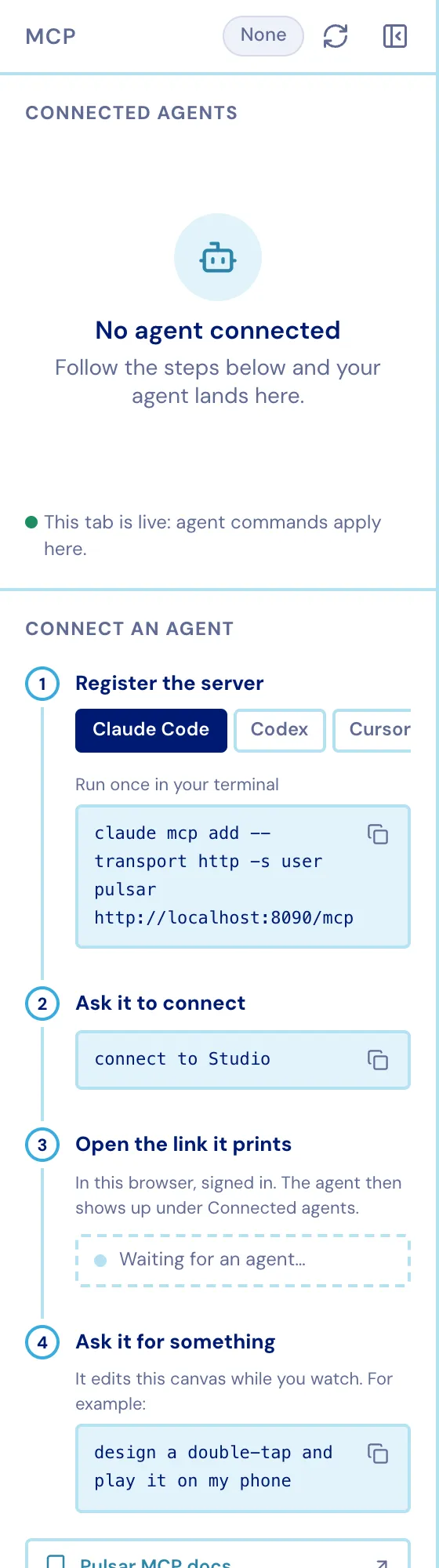
Then just describe what you want:
“Connect to Studio, then design a crisp double-tap and play it on my phone.”
What you can do with it
Section titled “What you can do with it”Once connected, the agent has one tool per editor operation. The MCP server describes every tool to the agent automatically, so you never have to list command names yourself. The capabilities, by group:
- Read state - inspect the editor, list projects and presets, read a preset or the current selection.
- Manage presets - create, duplicate, rename, delete, open a preset, open a project, and export a preset to the device pattern format.
- Edit patterns - add / update / delete points on intensity, frequency, and discrete layers; replace or merge whole envelopes and patterns; select, clear, undo, and redo.
- Play & preview - set the playhead and play range, play an audible preview locally, and stop.
- Work with media - list uploaded audio / animations, attach or detach them to a preset, and set the audio trim.
- Generate from audio - list the audio → haptics strategies, generate a pattern from an attached clip, and read audio or animation analysis (duration, energy envelope, onset peaks, frame data).
- Send to a device - list paired devices and send a pattern to your phone.
Every command targets the active preset - the one you’re looking at - unless the
agent names another. Times are milliseconds; intensities and frequencies are
normalized 0..1.
Privacy & control
Section titled “Privacy & control”- Account isolation - a command can only ever reach tabs signed into the account that authorized the link. The agent never sees other users’ work.
- Always visible - the “Agent connected” banner stays up the whole time an agent is linked.
- Kill switch - click Disconnect in the banner to drop the agent’s access at any time.