

Vertices and fragments
Compute pipelines are great for, well, computations, but they are not the best choice for drawing shapes.
The other type of pipelines supported by WebGPU are render pipelines. Render pipelines are used for drawing points, lines and triangles onto textures.
Whereas compute pipelines execute threads on a grid you define, render pipelines work in stages. You configure the pipeline to draw a kind of shape (points, lines, or triangles), and during the draw call:
- The vertex function runs once per vertex and outputs a screen position for it.
- The GPU calculates which pixels each shape covers in a process called rasterization.
- The fragment function runs once per covered pixel and outputs a color.
Drawing pixels
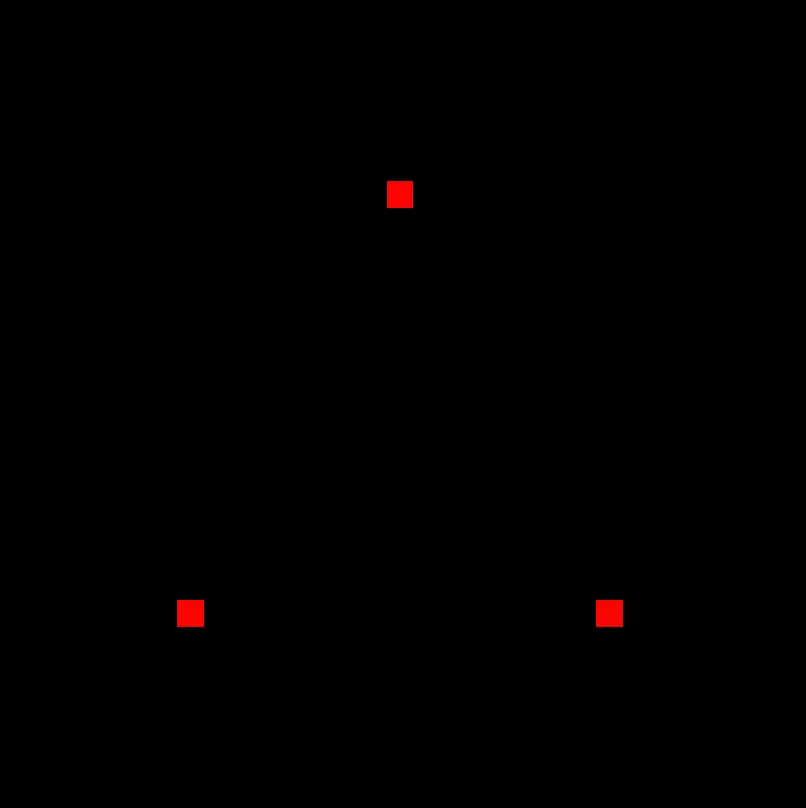
Section titled “Drawing pixels”The following example draws three red points.
Each point lands on a single pixel, since 'point-list' topology rasterizes each vertex to one pixel regardless of canvas size.
import { const tgpu: { const: typeof import("node_modules/typegpu/src/core/constant/tgpuConstant").constant; fn: typeof import("node_modules/typegpu/src/core/function/tgpuFn").fn; comptime: typeof import("node_modules/typegpu/src/core/function/comptime").comptime; resolve: typeof import("node_modules/typegpu/src/core/resolve/tgpuResolve").resolve; resolveWithContext: typeof import("node_modules/typegpu/src/core/resolve/tgpuResolve").resolveWithContext; init: typeof import("node_modules/typegpu/src/core/root/init").init; initFromDevice: typeof import("node_modules/typegpu/src/core/root/init").initFromDevice; slot: typeof import("node_modules/typegpu/src/core/slot/slot").slot; lazy: typeof import("node_modules/typegpu/src/core/slot/lazy").lazy; ... 10 more ...; '~unstable': typeof import("node_modules/typegpu/src/tgpuUnstable");}
import d
const root: TgpuRoot
const tgpu: { const: typeof import("node_modules/typegpu/src/core/constant/tgpuConstant").constant; fn: typeof import("node_modules/typegpu/src/core/function/tgpuFn").fn; comptime: typeof import("node_modules/typegpu/src/core/function/comptime").comptime; resolve: typeof import("node_modules/typegpu/src/core/resolve/tgpuResolve").resolve; resolveWithContext: typeof import("node_modules/typegpu/src/core/resolve/tgpuResolve").resolveWithContext; init: typeof import("node_modules/typegpu/src/core/root/init").init; initFromDevice: typeof import("node_modules/typegpu/src/core/root/init").initFromDevice; slot: typeof import("node_modules/typegpu/src/core/slot/slot").slot; lazy: typeof import("node_modules/typegpu/src/core/slot/lazy").lazy; ... 10 more ...; '~unstable': typeof import("node_modules/typegpu/src/tgpuUnstable");}
init: (options?: InitOptions) => Promise<TgpuRoot>
Requests a new GPU device and creates a root around it.
If a specific device should be used instead, use
init();
const const pipeline: TgpuRenderPipeline<d.Vec4f>
const root: TgpuRoot
WithBinding.createRenderPipeline<Record<string, any>, { [x: string]: any;}, { $position: d.v4f;}, d.v4f>(descriptor: TgpuRenderPipeline<in Targets = never>.DescriptorBase & { attribs?: { [x: string]: any; } | undefined; vertex: TgpuVertexFn<Record<string, any>, TgpuVertexFn<in VertexIn extends TgpuVertexFn.In = Record<string, never>, out VertexOut extends TgpuVertexFn.Out = TgpuVertexFn.Out>.Out> | ((input: AutoVertexIn<InferGPURecord<AttribRecordToDefaultDataTypes<{ [x: string]: any; }>>>) => AutoVertexOut<...>); fragment: TgpuFragmentFn<...> | ((input: AutoFragmentIn<...>) => d.v4f); targets?: TgpuColorTargetState;}): TgpuRenderPipeline<...> (+2 overloads)
TgpuRenderPipeline<in Targets = never>.DescriptorBase.primitive?: TgpuPrimitiveState
Describes the primitive-related properties of the pipeline.
primitive: { topology: "point-list"
vertex: TgpuVertexFn<Record<string, any>, TgpuVertexFn.Out> | ((input: AutoVertexIn<InferGPURecord<AttribRecordToDefaultDataTypes<{ [x: string]: any;}>>>) => AutoVertexOut<{ $position: d.v4f;}>)
$vertexIndex: number
vid: number
const positions: d.v2f[]
import d
const vec2f: d.Vec2f(x: number, y: number) => d.v2f (+3 overloads)
import d
const vec2f: d.Vec2f(x: number, y: number) => d.v2f (+3 overloads)
import d
const vec2f: d.Vec2f(x: number, y: number) => d.v2f (+3 overloads)
$position?: d.v4f | undefined
import d
const vec4f: d.Vec4f(v0: AnyNumericVec2Instance, z: number, w: number) => d.v4f (+9 overloads)
const positions: d.v2f[]
vid: number
fragment: TgpuFragmentFn<{} & Record<string, AnyFragmentInputBuiltin>, TgpuFragmentFn.Out> | ((input: AutoFragmentIn<InferGPURecord<{}>>) => d.v4f)
import d
const vec4f: d.Vec4f(x: number, y: number, z: number, w: number) => d.v4f (+9 overloads)
const canvas: HTMLCanvasElement
var document: Document
window.document returns a reference to the document contained in the window.
document.ParentNode.querySelector<"canvas">(selectors: "canvas"): HTMLCanvasElement | null (+4 overloads)
Returns the first element that is a descendant of node that matches selectors.
querySelector('canvas') as interface HTMLCanvasElement
The HTMLCanvasElement interface provides properties and methods for manipulating the layout and presentation of elements. The HTMLCanvasElement interface also inherits the properties and methods of the HTMLElement interface.
HTMLCanvasElement;const const context: GPUCanvasContext
const root: TgpuRoot
TgpuRoot.configureContext(options: ConfigureContextOptions): GPUCanvasContext
Creates and configures context for the provided canvas.
Automatically sets the format to navigator.gpu.getPreferredCanvasFormat() if not provided.
configureContext({ canvas: HTMLCanvasElement | OffscreenCanvas
The canvas for which a context will be created and configured.
canvas });
const pipeline: TgpuRenderPipeline<d.Vec4f>
TgpuRenderPipeline<Vec4f>.withColorAttachment(attachment: ColorAttachment): TgpuRenderPipeline<d.Vec4f>
Attaches texture views to the pipeline's targets (outputs).
withColorAttachment({ ColorAttachment.view: GPUCanvasContext | (ColorTextureConstraint & RenderFlag) | GPUTextureView | TgpuTextureView<d.WgslTexture<WgslTextureProps>> | TgpuTextureRenderView
A
GPUTextureView
describing the texture subresource that will be output to for this
color attachment.
view: const context: GPUCanvasContext
TgpuRenderPipeline<Vec4f>.draw(vertexCount: number, instanceCount?: number, firstVertex?: number, firstInstance?: number): void
It is a little more complicated than creating and dispatching a compute pipeline. Let us go through the code step by step.
-
Initialize the
root, just like we did in a previous guide.import { tgpu, d } from 'typegpu';const root = await tgpu.init(); -
Create the render pipeline with
root.createRenderPipeline, setting its topology to'point-list'. This will make the pipeline draw a point for each position returned from the vertex function.const pipeline = root.createRenderPipeline({primitive: { topology: 'point-list' },// ...}); -
Define a vertex function, which tells the GPU where each vertex is located. When dispatching the pipeline later, we’ll specify how many vertices to draw. The GPU runs this function once per vertex, with
$vertexIndexgoing from0up tocount - 1.vertex: ({ $vertexIndex: vid }) => {'use gpu';const positions = [d.vec2f(0.0, 0.5),d.vec2f(-0.5, -0.5),d.vec2f(0.5, -0.5),];return { $position: d.vec4f(positions[vid], 0, 1) };},The returned position is a 4-dimensional vector in clip space: X goes from
-1on the left to1on the right, and Y goes from-1on the bottom to1on the top. Z is used for depth testing (irrelevant here), and W can stay1for now, see homogeneous coordinates if you’re curious. -
Define a fragment function, which the GPU calls for each pixel covered by a shape. For
'point-list'topology, that’s exactly once per returned vertex. This particular fragment function always returns red.fragment: () => {'use gpu';return d.vec4f(1, 0, 0, 1);}, -
Query the canvas. This example assumes your page has a
<canvas>element.const canvas = document.querySelector('canvas') as HTMLCanvasElement; -
Call
root.configureContext. This will create and configure a context for the provided canvas. This context can be then used to render onto the canvas.const context = root.configureContext({ canvas }); -
Dispatch the pipeline by providing a color attachment and calling
.draw(count), wherecountis the number of vertices to draw. The color attachment specifies the draw target, plus optional props likeclearValueandloadOp.pipeline.withColorAttachment({ view: context }).draw(3);
Coloring pixels
Section titled “Coloring pixels”In the example above, the $position is the only value returned from the vertex function.
We can actually return more values.
In the example below, we pass in an additional color prop.
const const pipeline: TgpuRenderPipeline<d.Vec4f>
const root: TgpuRoot
WithBinding.createRenderPipeline<Record<string, any>, { [x: string]: any;}, { $position: d.v4f; color: d.v3f;}, d.v4f>(descriptor: TgpuRenderPipeline<in Targets = never>.DescriptorBase & { attribs?: { [x: string]: any; } | undefined; vertex: TgpuVertexFn<Record<string, any>, TgpuVertexFn<in VertexIn extends TgpuVertexFn.In = Record<string, never>, out VertexOut extends TgpuVertexFn.Out = TgpuVertexFn.Out>.Out> | ((input: AutoVertexIn<InferGPURecord<AttribRecordToDefaultDataTypes<{ [x: string]: any; }>>>) => AutoVertexOut<...>); fragment: TgpuFragmentFn<...> | ((input: AutoFragmentIn<...>) => d.v4f); targets?: TgpuColorTargetState;}): TgpuRenderPipeline<...> (+2 overloads)
TgpuRenderPipeline<in Targets = never>.DescriptorBase.primitive?: TgpuPrimitiveState
Describes the primitive-related properties of the pipeline.
primitive: { topology: "point-list"
vertex: TgpuVertexFn<Record<string, any>, TgpuVertexFn.Out> | ((input: AutoVertexIn<InferGPURecord<AttribRecordToDefaultDataTypes<{ [x: string]: any;}>>>) => AutoVertexOut<{ $position: d.v4f; color: d.v3f;}>)
$vertexIndex: number
vid: number
const positions: d.v2f[]
import d
const vec2f: d.Vec2f(x: number, y: number) => d.v2f (+3 overloads)
import d
const vec2f: d.Vec2f(x: number, y: number) => d.v2f (+3 overloads)
import d
const vec2f: d.Vec2f(x: number, y: number) => d.v2f (+3 overloads)
const colors: d.v3f[]
import d
const vec3f: d.Vec3f(x: number, y: number, z: number) => d.v3f (+5 overloads)
import d
const vec3f: d.Vec3f(x: number, y: number, z: number) => d.v3f (+5 overloads)
import d
const vec3f: d.Vec3f(x: number, y: number, z: number) => d.v3f (+5 overloads)
$position?: d.v4f | undefined
import d
const vec4f: d.Vec4f(v0: AnyNumericVec2Instance, z: number, w: number) => d.v4f (+9 overloads)
const positions: d.v2f[]
vid: number
color: d.v3f
const colors: d.v3f[]
vid: number
fragment: TgpuFragmentFn<{ color: d.Vec3f;} & Record<string, AnyFragmentInputBuiltin>, TgpuFragmentFn.Out> | ((input: AutoFragmentIn<InferGPURecord<{ color: d.Vec3f;}>>) => d.v4f)
color: d.v3f
import d
const vec4f: d.Vec4f(v0: AnyNumericVec3Instance, w: number) => d.v4f (+9 overloads)
color: d.v3f
const pipeline: TgpuRenderPipeline<d.Vec4f>
TgpuRenderPipeline<Vec4f>.withColorAttachment(attachment: ColorAttachment): TgpuRenderPipeline<d.Vec4f>
Attaches texture views to the pipeline's targets (outputs).
withColorAttachment({ ColorAttachment.view: GPUCanvasContext | (ColorTextureConstraint & RenderFlag) | GPUTextureView | TgpuTextureView<d.WgslTexture<WgslTextureProps>> | TgpuTextureRenderView
A
GPUTextureView
describing the texture subresource that will be output to for this
color attachment.
view: const context: GPUCanvasContext
TgpuRenderPipeline<Vec4f>.draw(vertexCount: number, instanceCount?: number, firstVertex?: number, firstInstance?: number): void
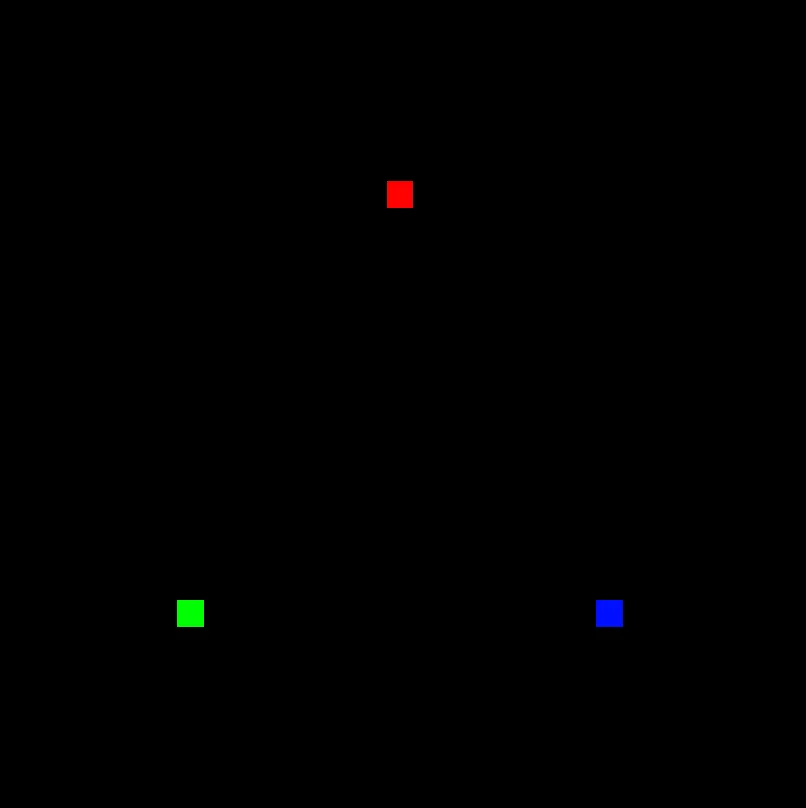
Each pixel ends up colored by the value returned by its vertex.
Lines and triangles
Section titled “Lines and triangles”Let’s change the topology from 'point-list' to 'line-strip'.
The vertex and fragment functions stay exactly the same.
This changes how the GPU connects the vertices together.
primitive: { topology: 'point-list' },primitive: { topology: 'line-strip' },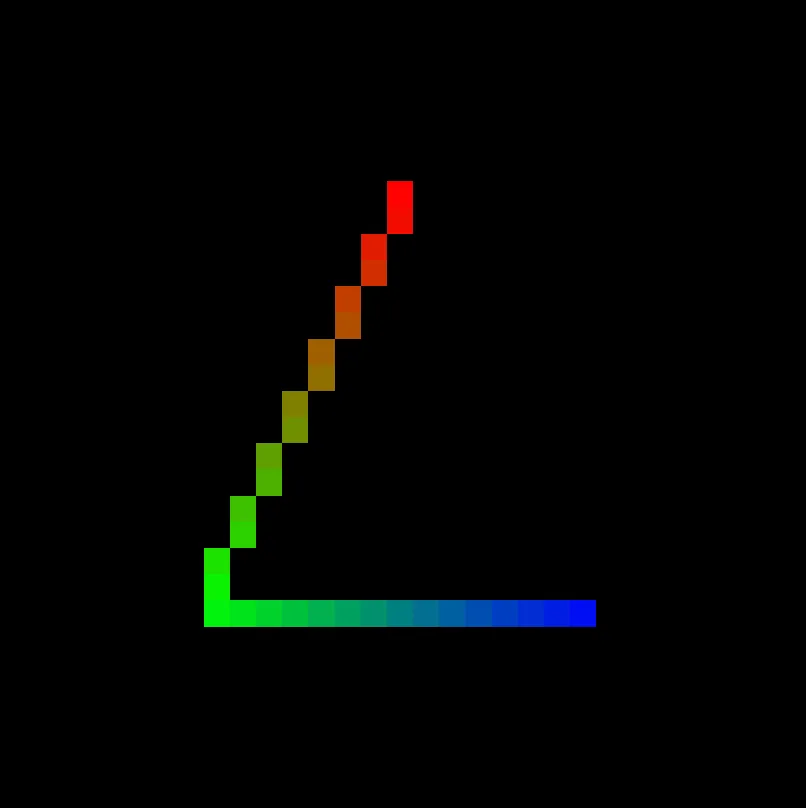
The fragment now runs for every pixel along the line between the first and second vertices, and again between the second and third.
Notice that the line’s color transitions smoothly from red to green to blue.
Each fragment receives values that are interpolated across the shape based on its position.
If the first vertex returns color d.vec3f(1, 0, 0) and the second returns color d.vec3f(0, 1, 0), then a pixel exactly halfway between them sees d.vec3f(0.5, 0.5, 0).
This applies to every extra prop returned by vertex, and this is a core principle of render pipelines.
Let’s change topology once more, this time to 'triangle-list' - the most widely used option.
primitive: { topology: 'line-strip' },primitive: { topology: 'triangle-list' },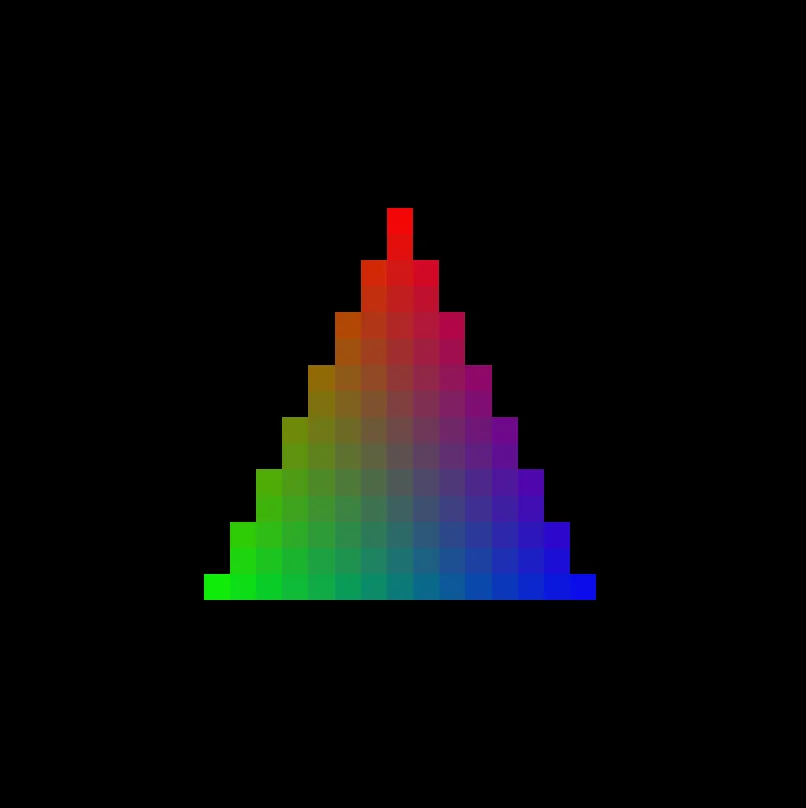
Here’s how it looks on a high-resolution canvas.
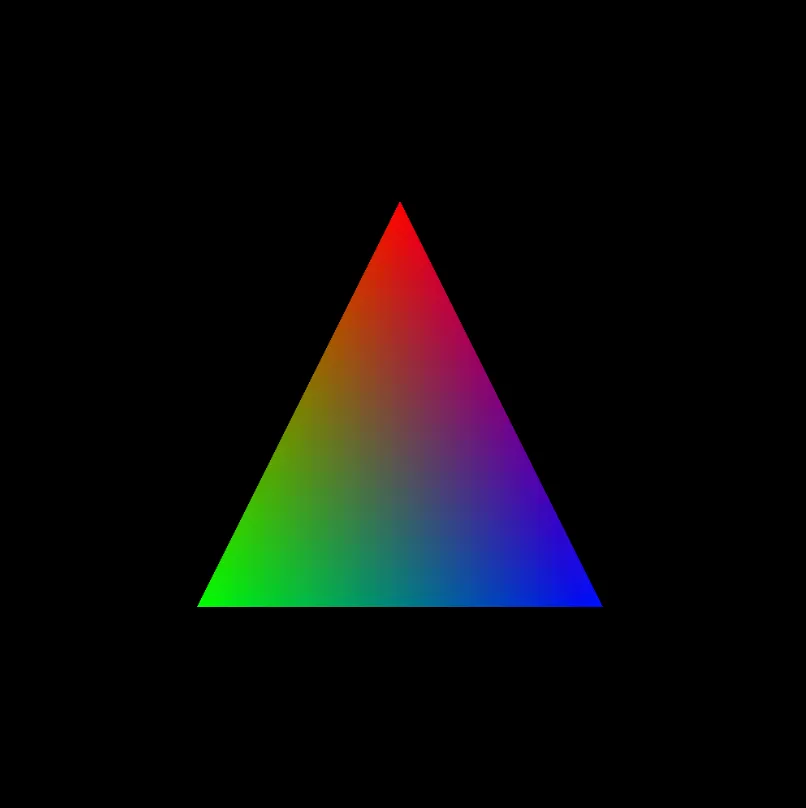
A triangle is drawn for each 3 vertices passed, and the fragment runs for every pixel covered by the triangle they define.
To draw more triangles, return more positions from the vertex function and pass a matching count to draw().
Two triangles require 6 vertices, three triangles require 9 and so on.
Moving image
Section titled “Moving image”In all examples above, we draw once and stop.
To animate, two things change: we call pipeline.draw() every frame, and we pass a value from JS into the shader that each frame can vary.
const const timeUniform: TgpuUniform<d.F32>
const root: TgpuRoot
TgpuRoot.createUniform<d.F32>(typeSchema: d.F32, initial?: number | ((buffer: TgpuBuffer<NoInfer<d.F32>>) => void) | undefined): TgpuUniform<d.F32> (+1 overload)
Allocates memory on the GPU, allows passing data between host and shader.
Read-only on the GPU, optimized for small data. For a general-purpose buffer,
use
TgpuRoot.createBuffer
.
createUniform(import d
const f32: d.F32export f32
A schema that represents a 32-bit float value. (equivalent to f32 in WGSL)
Can also be called to cast a value to an f32.
f32);
const const pipeline: TgpuRenderPipeline<d.Vec4f>
const root: TgpuRoot
WithBinding.createRenderPipeline<Record<string, any>, { [x: string]: any;}, { $position: d.v4f;}, d.v4f>(descriptor: TgpuRenderPipeline<in Targets = never>.DescriptorBase & { attribs?: { [x: string]: any; } | undefined; vertex: TgpuVertexFn<Record<string, any>, TgpuVertexFn<in VertexIn extends TgpuVertexFn.In = Record<string, never>, out VertexOut extends TgpuVertexFn.Out = TgpuVertexFn.Out>.Out> | ((input: AutoVertexIn<InferGPURecord<AttribRecordToDefaultDataTypes<{ [x: string]: any; }>>>) => AutoVertexOut<...>); fragment: TgpuFragmentFn<...> | ((input: AutoFragmentIn<...>) => d.v4f); targets?: TgpuColorTargetState;}): TgpuRenderPipeline<...> (+2 overloads)
TgpuRenderPipeline<in Targets = never>.DescriptorBase.primitive?: TgpuPrimitiveState
Describes the primitive-related properties of the pipeline.
primitive: { topology: "triangle-list"
vertex: TgpuVertexFn<Record<string, any>, TgpuVertexFn.Out> | ((input: AutoVertexIn<InferGPURecord<AttribRecordToDefaultDataTypes<{ [x: string]: any;}>>>) => AutoVertexOut<{ $position: d.v4f;}>)
$vertexIndex: number
vid: number
const positions: d.v2f[]
import d
const vec2f: d.Vec2f(x: number, y: number) => d.v2f (+3 overloads)
import d
const vec2f: d.Vec2f(x: number, y: number) => d.v2f (+3 overloads)
import d
const vec2f: d.Vec2f(x: number, y: number) => d.v2f (+3 overloads)
const offset: d.v2f
import d
const vec2f: d.Vec2f(x: number, y: number) => d.v2f (+3 overloads)
import std
function sin(value: number): number (+1 overload)export sin
const timeUniform: TgpuUniform<d.F32>
TgpuUniform<F32>.$: number
import std
function cos(value: number): number (+1 overload)export cos
const timeUniform: TgpuUniform<d.F32>
TgpuUniform<F32>.$: number
$position?: d.v4f | undefined
import d
const vec4f: d.Vec4f(v0: AnyNumericVec2Instance, z: number, w: number) => d.v4f (+9 overloads)
const positions: d.v2f[]
vid: number
const offset: d.v2f
fragment: TgpuFragmentFn<{} & Record<string, AnyFragmentInputBuiltin>, TgpuFragmentFn.Out> | ((input: AutoFragmentIn<InferGPURecord<{}>>) => d.v4f)
import d
const vec4f: d.Vec4f(x: number, y: number, z: number, w: number) => d.v4f (+9 overloads)
function frame(timestamp: number): void
timestamp: number
const timeUniform: TgpuUniform<d.F32>
TgpuBufferBindingBase<F32>.write(data: number, options?: BufferWriteOptions): void
timestamp: number
const pipeline: TgpuRenderPipeline<d.Vec4f>
TgpuRenderPipeline<Vec4f>.withColorAttachment(attachment: ColorAttachment): TgpuRenderPipeline<d.Vec4f>
Attaches texture views to the pipeline's targets (outputs).
withColorAttachment({ ColorAttachment.view: GPUCanvasContext | (ColorTextureConstraint & RenderFlag) | GPUTextureView | TgpuTextureView<d.WgslTexture<WgslTextureProps>> | TgpuTextureRenderView
A
GPUTextureView
describing the texture subresource that will be output to for this
color attachment.
view: const context: GPUCanvasContext
TgpuRenderPipeline<Vec4f>.draw(vertexCount: number, instanceCount?: number, firstVertex?: number, firstInstance?: number): void
function requestAnimationFrame(callback: FrameRequestCallback): number
function frame(timestamp: number): void
function requestAnimationFrame(callback: FrameRequestCallback): number
function frame(timestamp: number): void
requestAnimationFrame calls frame once per repaint and passes a timestamp in milliseconds.
We divide by 1000 to get seconds and write that into timeUniform, which the vertex function reads as timeUniform.$.
Skipping the geometry
Section titled “Skipping the geometry”Before, we drew points and lines in a very low resolution. On high resolution canvases, they are barely visible. Unfortunately, there is no way to change the thickness of the drawn points and lines. To draw bigger points and lines, people usually use many triangles to approximate the shape.
There is however a different approach, that skips the geometry altogether.
import { const tgpu: { const: typeof import("node_modules/typegpu/src/core/constant/tgpuConstant").constant; fn: typeof import("node_modules/typegpu/src/core/function/tgpuFn").fn; comptime: typeof import("node_modules/typegpu/src/core/function/comptime").comptime; resolve: typeof import("node_modules/typegpu/src/core/resolve/tgpuResolve").resolve; resolveWithContext: typeof import("node_modules/typegpu/src/core/resolve/tgpuResolve").resolveWithContext; init: typeof import("node_modules/typegpu/src/core/root/init").init; initFromDevice: typeof import("node_modules/typegpu/src/core/root/init").initFromDevice; slot: typeof import("node_modules/typegpu/src/core/slot/slot").slot; lazy: typeof import("node_modules/typegpu/src/core/slot/lazy").lazy; ... 10 more ...; '~unstable': typeof import("node_modules/typegpu/src/tgpuUnstable");}
import d
import std
const fullScreenTriangle: TgpuVertexFn<{}, { uv: d.Vec2f;}>
A vertex function that defines a single full-screen triangle out
of three points.
fullScreenTriangle } from 'typegpu/common';
const const root: TgpuRoot
const tgpu: { const: typeof import("node_modules/typegpu/src/core/constant/tgpuConstant").constant; fn: typeof import("node_modules/typegpu/src/core/function/tgpuFn").fn; comptime: typeof import("node_modules/typegpu/src/core/function/comptime").comptime; resolve: typeof import("node_modules/typegpu/src/core/resolve/tgpuResolve").resolve; resolveWithContext: typeof import("node_modules/typegpu/src/core/resolve/tgpuResolve").resolveWithContext; init: typeof import("node_modules/typegpu/src/core/root/init").init; initFromDevice: typeof import("node_modules/typegpu/src/core/root/init").initFromDevice; slot: typeof import("node_modules/typegpu/src/core/slot/slot").slot; lazy: typeof import("node_modules/typegpu/src/core/slot/lazy").lazy; ... 10 more ...; '~unstable': typeof import("node_modules/typegpu/src/tgpuUnstable");}
init: (options?: InitOptions) => Promise<TgpuRoot>
Requests a new GPU device and creates a root around it.
If a specific device should be used instead, use
init();const const canvas: HTMLCanvasElement
var document: Document
window.document returns a reference to the document contained in the window.
document.ParentNode.querySelector<"canvas">(selectors: "canvas"): HTMLCanvasElement | null (+4 overloads)
Returns the first element that is a descendant of node that matches selectors.
querySelector('canvas') as interface HTMLCanvasElement
The HTMLCanvasElement interface provides properties and methods for manipulating the layout and presentation of elements. The HTMLCanvasElement interface also inherits the properties and methods of the HTMLElement interface.
HTMLCanvasElement;const const context: GPUCanvasContext
const root: TgpuRoot
TgpuRoot.configureContext(options: ConfigureContextOptions): GPUCanvasContext
Creates and configures context for the provided canvas.
Automatically sets the format to navigator.gpu.getPreferredCanvasFormat() if not provided.
configureContext({ canvas: HTMLCanvasElement | OffscreenCanvas
The canvas for which a context will be created and configured.
canvas, alphaMode?: GPUCanvasAlphaMode | undefined
Determines the effect that alpha values will have on the content of textures returned by
GPUCanvasContext#getCurrentTexture
when read, displayed, or used as an image source.
alphaMode: 'premultiplied' });
const const pipeline: TgpuRenderPipeline<d.Vec4f>
const root: TgpuRoot
WithBinding.createRenderPipeline<{}, {}, { uv: d.Vec2f;}, d.v4f>(descriptor: TgpuRenderPipeline<in Targets = never>.DescriptorBase & { attribs?: {} | undefined; vertex: TgpuVertexFn<{}, { uv: d.Vec2f; }> | ((input: AutoVertexIn<InferGPURecord<AttribRecordToDefaultDataTypes<{}>>>) => AutoVertexOut<AnyAutoCustoms>); fragment: TgpuFragmentFn<{ uv: d.Vec2f; } & Record<string, AnyFragmentInputBuiltin>, TgpuFragmentFn<in Varying extends TgpuFragmentFn.In = Record<...>, out Output extends TgpuFragmentFn.Out = TgpuFragmentFn.Out>.Out> | ((input: AutoFragmentIn<...>) => d.v4f); targets?: TgpuColorTargetState;}): TgpuRenderPipeline<...> (+2 overloads)
TgpuRenderPipeline<in Targets = never>.DescriptorBase.primitive?: TgpuPrimitiveState
Describes the primitive-related properties of the pipeline.
primitive: { topology: "triangle-list"
vertex: TgpuVertexFn<{}, { uv: d.Vec2f;}> | ((input: AutoVertexIn<InferGPURecord<AttribRecordToDefaultDataTypes<{}>>>) => AutoVertexOut<AnyAutoCustoms>)
const fullScreenTriangle: TgpuVertexFn<{}, { uv: d.Vec2f;}>
A vertex function that defines a single full-screen triangle out
of three points.
fullScreenTriangle, fragment: TgpuFragmentFn<{ uv: d.Vec2f;} & Record<string, AnyFragmentInputBuiltin>, TgpuFragmentFn.Out> | ((input: AutoFragmentIn<InferGPURecord<{ uv: d.Vec2f;}>>) => d.v4f)
uv: d.v2f
import std
distance<d.v2f>(a: d.v2f, b: d.v2f): number (+1 overload)export distance
uv: d.v2f
import d
const vec2f: d.Vec2f(xy: number) => d.v2f (+3 overloads)
import d
const vec4f: d.Vec4f(x: number, y: number, z: number, w: number) => d.v4f (+9 overloads)
import d
const vec4f: d.Vec4f(x: number, y: number, z: number, w: number) => d.v4f (+9 overloads)
const pipeline: TgpuRenderPipeline<d.Vec4f>
TgpuRenderPipeline<Vec4f>.withColorAttachment(attachment: ColorAttachment): TgpuRenderPipeline<d.Vec4f>
Attaches texture views to the pipeline's targets (outputs).
withColorAttachment({ ColorAttachment.view: GPUCanvasContext | (ColorTextureConstraint & RenderFlag) | GPUTextureView | TgpuTextureView<d.WgslTexture<WgslTextureProps>> | TgpuTextureRenderView
A
GPUTextureView
describing the texture subresource that will be output to for this
color attachment.
view: const context: GPUCanvasContext
TgpuRenderPipeline<Vec4f>.draw(vertexCount: number, instanceCount?: number, firstVertex?: number, firstInstance?: number): void

The fullScreenTriangle vertex function (from typegpu/common) returns positions that lie outside clip space, so a single triangle ends up covering the entire visible canvas.
Alongside $position it outputs uv, a 2D coordinate that runs from (0, 0) to (1, 1) across the canvas.
The fragment function receives the interpolated uv in each pixel.
Each pixel then colors itself based on the distance from its uv to the center (0.5, 0.5): closer than 0.2 is red, otherwise black.
© Software Mansion 2026. All trademarks and copyrights belong to their respective owners. Read about our Privacy Policy.